A Command Bar for Windows, Supercharged.
The command bar for Windows that puts clipboard, media, meetings, and more at your fingertips.
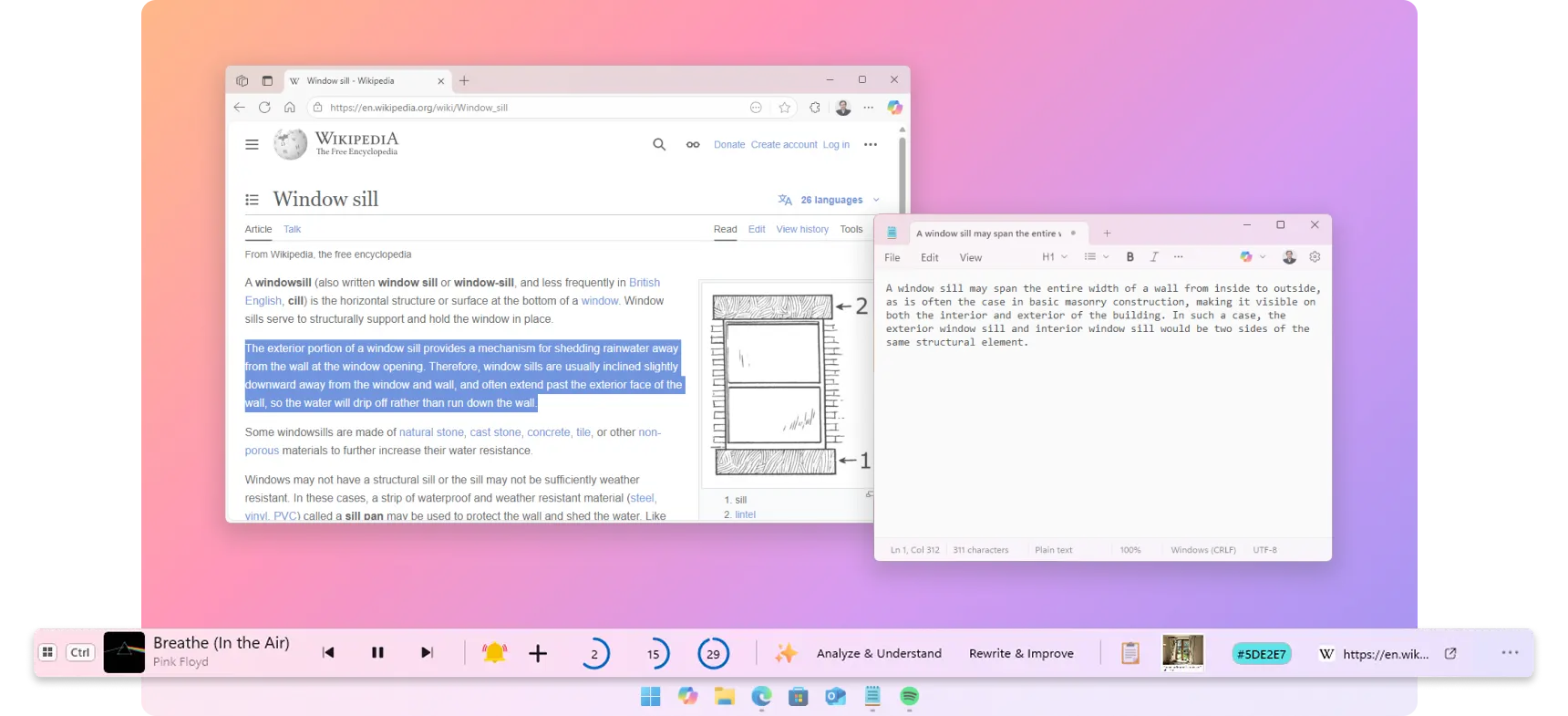
The command bar for Windows that puts clipboard, media, meetings, and more at your fingertips.
As Featured On

A few testimonies extracted from Microsoft Store and YouTube.
I really needed something like this 🙏🙏
This is definitely a very good app for what it is! Would recommend to anyone who wants to customise Windows!
Several useful tools just 1 click away, it has become an essential app in my workflow!
This cool little bar at the bottom of my screen, made me feel like I have got some super controls over my computer. I appreciate all the combined efforts to make that function in a classy way. I really am obsessed with the audio controller, the clipboard text editing AI links and the mini quick remainder option. It makes a lot of tasks so easy and simple, it reduces your taps per action. You could do a real lot of things and guess there are more upcoming. with all these features it still doesn't feel out of box, still vibes in with my windows and blends in seamlessly with all my apps improving the looks.
As a power user I love the way this has improved my workflow!
Using it in Notion is be a huge time-saver!
I know this app only came out recently (and is still in preview), so i can't give it a bad review for the lack of features, but there are so many features it could have that would be sooo useful - like showing the date/time, pinning apps/files, showing notifications - the possibilities are endless for a taskbar on top of a taskbar lol
Very useful even though I don't use the AI features
Swiss Army knife of utility bars, simple and efficient to what it proposes and with a good possibility of customization. Very complete free version.
very nice and make our life easy as I don't need to go to the player to control the audio
I'm loving it and it's not even the lifetime version.
The image tool and color picker are the ones I use the most.
A window sill is the ledge at the bottom of a window, the place where you keep things within arm's reach. WindowSill does the same for your desktop: a slim bar between your taskbar and your apps, holding every tool you need.
Media controls live right in the bar. Skip tracks, pause, or adjust your music without moving your hands or breaking focus.
Works with Spotify, YouTube, Netflix, Apple Music, Deezer, and virtually any media player on your system.
A built-in clipboard manager keeps your clipboard history close: everything you've copied today is saved, and you can paste any previous item with a single click.
Supports text, images, URLs, colors, and more. Screen Recording Protection keeps your data hidden when an app records the screen, and passwords are auto-hidden.
Select any unit or currency in any app. The converted value appears right away. No Googling, no calculator apps.
Miles to kilometers, Fahrenheit to Celsius, USD to EUR. Just highlight the text. Currency rates update daily.
Set a quick desktop reminder and get back to work. When it's time, a full-screen alert makes sure you actually see it. No buried notification you'll swipe away.
Prefer something gentler? Switch to standard toast notifications instead.
Especially helpful for ADHD users and anyone who needs clear, unmissable nudges to stay on track.
Meeting controls for Microsoft Teams sit in the bar. Mute, unmute, react, or leave a call even when the meeting window is minimized. No more fumbling to find the right window when someone asks you a question.
Currently supports Microsoft Teams, with more apps coming soon.
Need to resize, compress, or convert an image or video? Select the files in File Explorer. The tools appear in the bar. No heavyweight editor required.
Handle one file or batch-process dozens at once.
Select any URL in any app, shorten it for cleaner sharing, or turn it into a QR code.
Zoom any webpage in or out from the bar. WindowSill detects your active browser automatically.
Supports Chrome, Firefox, Edge, Opera, Vivaldi, Brave, and Zen.
Add Windows extensions to fit the way you work: a Pomodoro timer for focus sessions, an app launcher for one-click access to your favorite tools, a color picker, system monitors, and more. Anchor the bar to any edge of any monitor and choose the size that suits you.
Fix grammar, translate, rewrite, or change tone without copying text into a separate tool.
Wondering how WindowSill stacks up against other tools? We put together honest, side-by-side comparisons.
WindowSill isn't locked to one app. Select text or trigger actions anywhere on your system and get results on the spot.

Figma
Design

Stack Exchange
Social Media

Amazon
Shopping

Notion
Writing

Communication

Google Docs
Writing

Stack Overflow
Social Media

Visual Studio
Development
Google Sheets
Spreadsheets

YouTube
Media Player

Teams
Communication

Slack
Communication

Notepad++
Development

Spotify
Media Player

Word
Writing

Vivaldi
Browser

Social Media
OneNote
Writing

Opera
Browser

GitHub
Development

Social Media

Excel
Spreadsheets

WordPress
Writing

Chrome
Browser

PowerPoint
Writing

Outlook
Communication

Social Media

Discord
Communication

Edge
Browser

Gmail
Communication
One bar. Every shortcut you wish Windows had. Free to download.
Available for Windows 10 and 11.

Rejoining the server…
Retrying in s…
Connection lost.
Session paused.
Resume failed.