I used to rehearse sentences in my head before walking over to a coworker's desk. I'm French, and when I did my first internship at Microsoft in the US, my English was rough. I'd open Google Translate, type what I wanted to say in French, read the English output a few times, then go say it out loud. If the conversation went off-script, we'd both stop and pull up a translator on someone's phone so I could understand what was happening.
That was clumsy. But it worked. And it taught me something that stuck with me: the barrier to communicating across languages isn't vocabulary. It's friction. The more steps between your thought and the other person understanding it, the more likely the message gets lost or you just don't bother sending it.
This article is about reducing that friction, both in how you write and in when you reach for a translator.
Why Clear Writing Matters More Than Perfect Translation
Here's a take that might be unpopular: writing clearly in your own language is more important than translating perfectly. A well-structured sentence in simple English will survive machine translation far better than a complex one full of idioms and cultural references.
According to the Plain Language Action and Information Network, US federal agencies are required to write in plain language because it reduces misunderstanding across reading levels and language backgrounds. The same principle applies to workplace writing. If your colleague in Tokyo or São Paulo is reading your Slack message through a translator, short sentences with common words give that translator much less room to get things wrong.
I learned this the hard way. Early in my career, I'd write messages the way I thought native English speakers wrote: long sentences, filler phrases, idioms I'd picked up from TV. I heard from coworkers that sometimes even native speakers had to re-read what I meant. When I started writing shorter, plainer sentences, everyone understood me better, not just the non-native speakers.
Seven Rules for Writing Across Language Barriers
These aren't theoretical. They come from years of being the person on both sides of the language gap.
1. Use short sentences
One idea per sentence. If you have a comma followed by "and" or "but," that's often two sentences trying to be one. Break them apart.
Instead of: "I think we should push the release to next week because the test results weren't great and we still need to fix the auth bug, but if you disagree we can talk about it."
Try: "I think we should push the release to next week. The test results weren't great, and the auth bug still needs a fix. Happy to discuss if you see it differently."
2. Avoid idioms and slang
"Let's circle back," "move the needle," "boil the ocean," "low-hanging fruit." These phrases are hard to translate and even harder to understand for non-native speakers. Say what you mean instead.
Instead of: "Let's not boil the ocean here."
Try: "Let's focus on the most important parts first."
3. Define acronyms the first time
What's obvious to your team isn't obvious to everyone. Write "pull request (PR)" the first time, then use "PR" after that. This is especially true in async communication where someone might join the thread late.
4. Break up walls of text
Bullet points, numbered lists, and short paragraphs are your friends. A block of text in a second language is intimidating. Structure makes it scannable, and scannable text is easier to translate mentally or with a tool.
5. Be explicit about what you need
"Can you take a look at this?" is vague in any language. "Can you review the pricing section and tell me if the numbers look right?" gives the reader a clear task. When someone is working in their second (or third) language, ambiguity costs extra mental effort.
6. Skip the politeness padding
This one is cultural, and I say it with respect. Many English-speaking workplaces pad messages with softeners: "I was just wondering if maybe you might have a chance to possibly..." Strip that down. "Can you review this by Thursday?" is clearer and translates better. Most cultures appreciate directness in professional settings more than English speakers expect.
7. Read your message as if English were your second language
Before hitting send, re-read what you wrote. Would you understand it if you had an intermediate grasp of English? If a sentence takes two reads to parse, rewrite it.
When to Translate (And When Not To)
Not every message needs translation. Here's a practical framework:
Translate when:
- You're writing a formal document, proposal, or announcement that goes to a specific language group
- The recipient has told you they prefer their native language
- You're writing instructions or documentation that people will reference repeatedly
- The stakes are high (contracts, sensitive feedback, important decisions)
Don't translate when:
- You're chatting casually in a shared language (even if imperfectly)
- The recipient clearly understands your language well
- Speed matters more than polish (quick Slack messages, standup updates)
- You're in a meeting and can clarify in real time
The gray area is where most workplace communication lives. My rule of thumb: if I'd feel embarrassed by a misunderstanding, I translate. If I wouldn't, I write clearly and move on.
How AI Changed Translation for Everyday Work
Traditional translation tools work fine for full documents. You paste text in, get text out, copy it somewhere else. But that workflow doesn't fit how most people write at work: quick messages, emails, comments on pull requests, notes in project management tools.
What changed things for me was inline translation, the ability to translate text right where I'm writing without switching apps or tabs. The context stays intact, the flow doesn't break, and I'm more likely to actually do it instead of thinking "eh, they'll probably understand."
AI-powered translation has also gotten remarkably good for common language pairs. For workplace communication (not literary translation or legal documents), the output from modern models is usually accurate enough to send without heavy editing.
Picking the Right AI Model for Translation
Not all AI models are equal for translation, and you don't need the most expensive one. Here's what I've found:
For everyday messages and emails, smaller, faster models work great. Something like GPT-5.2 Nano or a similar lightweight model gives you solid translations in under a second and costs a fraction of the larger models. Translation is a well-understood task. You don't need a model that can write poetry to translate "the deployment is scheduled for Friday."
For formal documents or nuanced content, step up to a mid-tier model. The extra context handling helps with tone, formality levels, and technical terminology.
For most people, the sweet spot is speed and price. A fast, affordable model that you'll actually use for every message beats a premium model you only pull out for big documents. The goal is to make translation so low-friction that it becomes a habit, not a chore.
How WindowSill Handles Inline Translation
This is where I get to talk about something I built. WindowSill is a Windows desktop app with a bunch of productivity tools, and one of them is AI-powered text suggestions, including translation. The app itself is free; the AI features require a license.
Here's how it works: you select text anywhere on your screen, open the WindowSill AI panel, and pick a target language. The translation appears inline, right where you're working. No tab switching, no copy-paste dance. WindowSill supports over 30 languages, from Spanish and French to Korean, Arabic, and Thai. And if your target language isn't in the list, you can type it in manually.
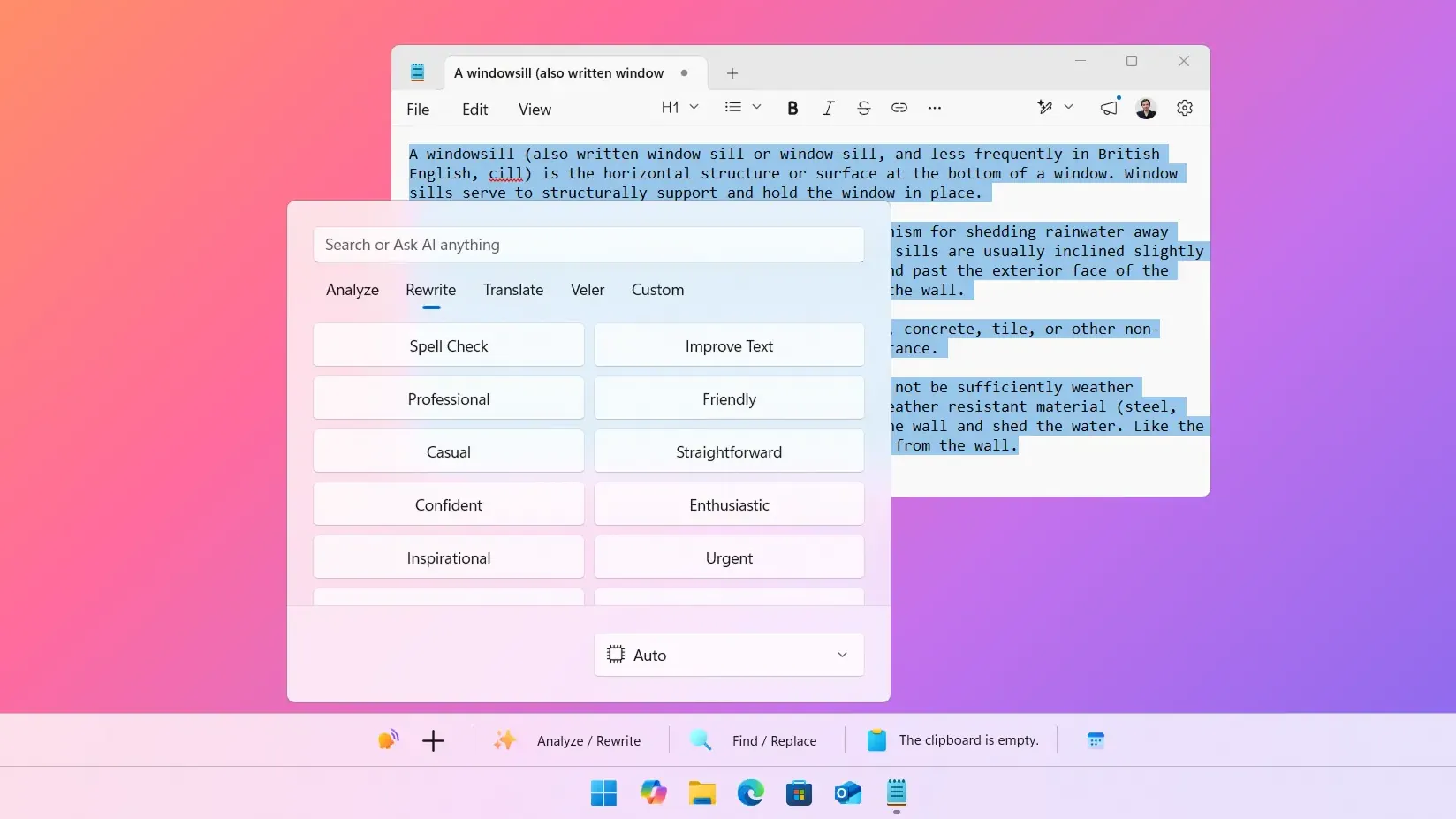
The translation runs through whatever AI model you've configured. I recommend starting with a fast, affordable model for day-to-day translation. You'll get results in about a second, and the cost per translation is negligible. For important documents where tone matters more, you can switch to a more capable model without leaving the app.
The thing I care about most: it fits into your existing workflow. You don't open a translation app. You don't go to a website. You select, translate, and keep writing. That's the friction reduction I was talking about at the start of this article.
WindowSill is free to download and use for its non-AI tools. For AI features like translation, you can subscribe to the WindowSill AI service or get a lifetime license and bring your own API key to control the cost and model. Give it a try and see if it changes how often you translate at work.
Frequently Asked Questions
What's the best way to write emails for non-native English speakers?
Keep sentences short, avoid idioms and slang, and be explicit about what you need. Use bullet points for multiple items. Plain language translates better, both by humans and by machines, and it's easier to read for everyone regardless of language ability.
Should I translate my messages or write in simple English?
It depends on the situation. For casual, quick communication where both parties share a working language, simple English is fine. For formal documents, instructions, or high-stakes conversations, translating into the recipient's native language shows respect and reduces the chance of misunderstanding.
How accurate is AI translation for workplace communication?
For common language pairs and everyday business writing, AI translation is very accurate. It handles standard professional language well. Where it can struggle is with highly technical jargon, humor, cultural references, and ambiguous sentences. Writing clearly in the source language improves the output.
What AI model should I use for translation?
For most workplace translation, a fast and affordable model is the best choice. Translation is a well-established task that smaller models handle effectively. Save larger, more expensive models for documents where nuance, tone, and formality matter.
Is WindowSill's translation feature free?
WindowSill itself is free, but the AI features (including translation) require either a WindowSill AI subscription or your own API key.
That rehearsed-sentence routine I mentioned at the start? I don't do that anymore. Not because my English got perfect (it didn't), but because the tools caught up. When translation is one click away, you stop hesitating and start communicating. That's the whole point.