The average office worker receives around 120 emails per day, according to a 2019 article from Matt Plummer. That's 120 subject lines competing for attention between meetings, Slack pings, and whatever's on fire today. Most of those emails get skimmed. Many get ignored entirely.
The difference between an email that gets read and one that gets archived isn't luck. It's structure. And the good news is that writing better emails doesn't take more time. It takes less.
Start with the subject line (because that's where most emails die)
Your email lives or dies in the inbox preview. If the subject line doesn't earn a click, nothing else matters.
A few rules that hold up:
Be specific, not clever. "Q3 budget approval needed by Friday" beats "Quick question" every time. The reader should know what the email is about and what you need before they open it.
Front-load the action. If you need something, say so upfront. "Review needed:" or "Decision by Thursday:" tells the reader what kind of email this is. People triage their inbox. Give them the information to triage yours correctly.
Keep it under 50 characters when you can. Mobile email clients (where more than half of emails are opened, per Litmus's State of Email report) truncate long subject lines. If the important part gets cut off, you've lost your advantage.
Bad subject lines have something in common: they're vague. "Update," "Following up," "FYI," "Hey." These tell the reader nothing. They get opened last, if at all.
Write the first sentence like it's the only sentence they'll read
Because it might be. Email clients show a preview snippet next to the subject line, and that snippet is usually the first line of your message. If you open with "Hope you're doing well!" or "Just circling back on this," you've wasted the most visible real estate in the entire email.
Put the point first. What do you need, and by when?
Compare these two openings:
"Hi Sarah, hope you had a good weekend! I wanted to circle back on the conversation we had last week about the vendor contract. I've been thinking about it and I think we should discuss a few things before moving forward."
"Hi Sarah, I need your approval on the vendor contract by Wednesday so we can meet the May 1 deadline. Two questions below."
The second version tells Sarah exactly what's happening in under 20 words. She can prioritize it instantly.
Shorter emails get faster replies
This one's backed by data. A study by Boomerang analyzing over 40 million emails found that emails between 50 and 125 words had the highest response rates. Once you go beyond 200 words, response rates drop off.
That doesn't mean every email should be two sentences. Some topics need space. But most emails contain more words than ideas. The fix isn't writing less, it's cutting what doesn't carry weight.
A quick editing pass does the job:
- Delete the warm-up. "I hope this email finds you well" adds nothing. Skip it.
- Cut repeated context. If you're replying to a thread, the recipient already knows the background. Don't retell it.
- Replace paragraphs with bullets. If you have three points, three bullets will always be clearer than three paragraphs.
- Remove hedging language. "I was just wondering if you might possibly have time to maybe..." is doing a lot of work to say "Can you...?"
Tone is harder than it looks
Email strips out all the context that makes in-person communication easy. No facial expressions, no vocal tone, no body language. What feels direct to you can read as curt to someone else. What feels polite to you can read as passive-aggressive to your reader.
A few tone traps to watch for:
"Per my last email" has become a meme for a reason. It reads as hostile whether you mean it that way or not. If someone missed your earlier point, restate it plainly.
Exclamation points are a minefield. One "Thanks!" feels warm. Three in the same email feels unhinged. Zero can feel cold in certain contexts. There's no universal rule here, but one per email is a safe ceiling.
"Please advise" sounds formal in a way that creates distance. "What do you think?" or "How should I handle this?" works better in most workplaces.
The simplest tone test: read the email as if someone you barely know sent it to you. Does it sound like a normal human? Then send it.
Format for scanning, not reading
People don't read emails. They scan them. Design for that.
Use bold text for the key ask. If there's one thing you need the reader to do, make it impossible to miss. "I need your sign-off on the attached proposal by end of day Thursday" pops out of a paragraph in a way that a plain sentence doesn't.
One email, one topic. If you have two unrelated things to discuss, send two emails. Multi-topic emails are where action items go to die, because the reader handles the easy one and forgets the other.
Number your questions. If you're asking three things, number them 1, 2, 3. This makes it trivially easy for the reader to respond to each point, and it makes it obvious when one gets missed.
Put deadlines in the first or last line. Those are the two spots that get the most attention. Burying a deadline in the middle of paragraph three is asking for it to be missed.
The five-second test
Before you hit send, try this: glance at the email for five seconds and look away. Can you remember what it's asking for? If not, restructure it.
This sounds too simple to be useful, but it catches most of the common problems. If the ask isn't clear in five seconds, the reader won't find it in five minutes either.
A note on AI and email writing
Rewriting a draft email by hand is tedious. You know the tone is wrong, or it's too long, or it sounds too stiff, but fixing it means re-reading, restructuring, and second-guessing yourself for longer than the email is worth.
That's why I built WindowSill with inline AI text tools. You can select a draft email in Outlook, Gmail, or any app, open WindowSill with a keyboard shortcut, and pick an action: make it shorter, adjust the tone, fix the grammar, or rewrite it entirely. The result appears right there, with a diff view showing what changed. Accept it, and the polished version goes back into your email, replacing the original text.
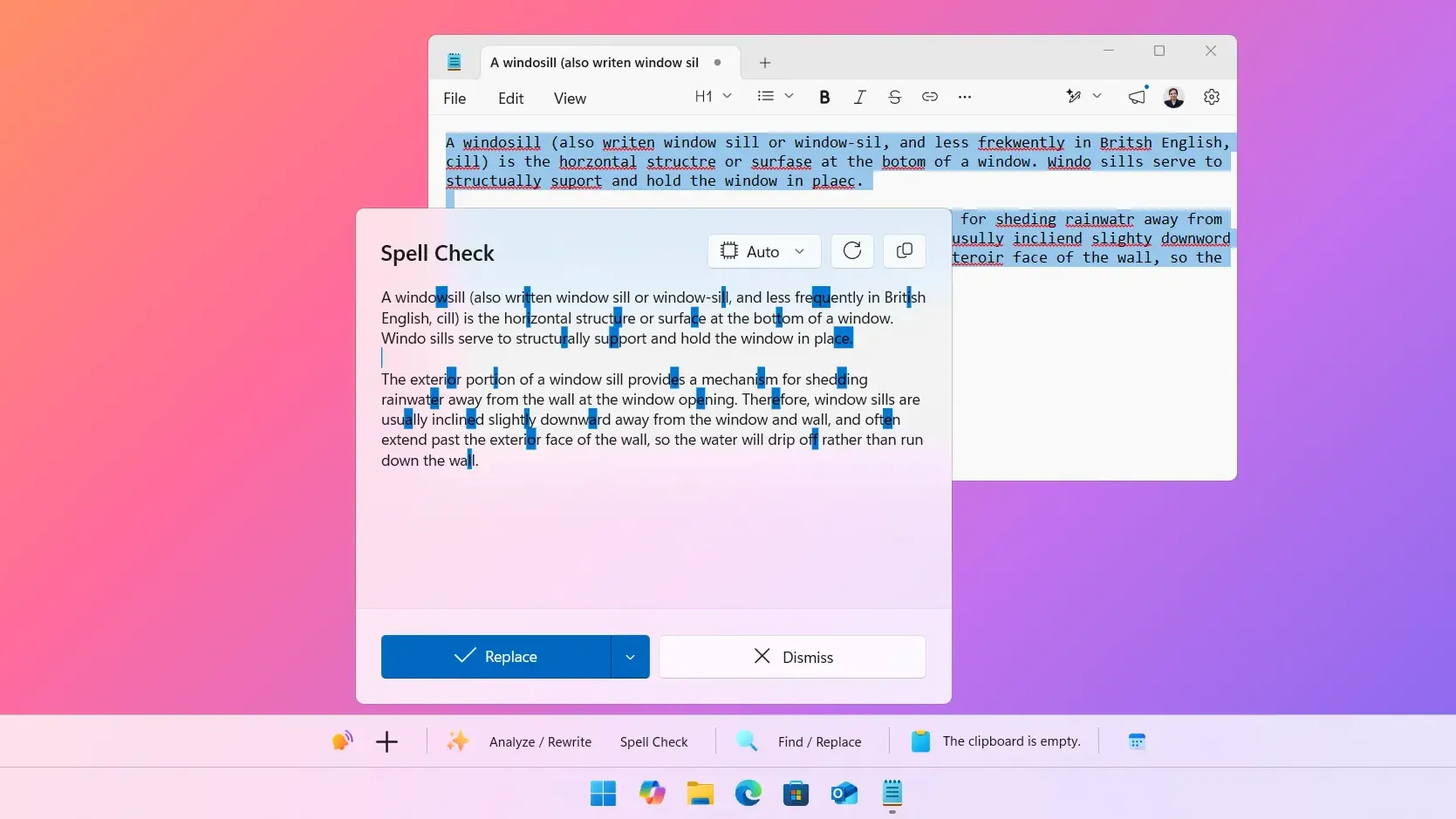
No switching tabs. No pasting into ChatGPT and pasting back. You write where you already write, and WindowSill handles the polish. It supports nine tone presets (professional, friendly, casual, and more), plus custom prompts if you have a specific voice you want to hit. And if you care about privacy, you can run the whole thing through a local AI model with Ollama or LM Studio, so your emails never leave your machine.
Writing better emails is a skill. But polishing them doesn't have to be a chore.
Frequently Asked Questions
How long should a professional email be?
Between 50 and 125 words hits the sweet spot for response rates, based on Boomerang's analysis of 40 million emails. Longer emails are fine when the topic demands it, but most emails contain more words than necessary. Edit down, then edit again.
What makes a good email subject line?
A good subject line is specific, front-loads the action needed, and stays under 50 characters when possible. "Budget approval needed by Friday" outperforms "Quick question" because it tells the reader what the email is about before they open it.
How do I make my emails sound less cold?
Read the email as if a stranger sent it to you. If it sounds robotic, add one human touch: a brief acknowledgment, a "thanks for handling this," or a specific reference to something you discussed. One warm line does more than five exclamation points.
Should I use AI to write my emails?
AI is better as an editor than a ghostwriter. Write the email yourself so the ideas and intent are yours, then use AI to tighten the phrasing, fix grammar, or adjust the tone. Tools like WindowSill let you do this inline without leaving your email client.